> ## Documentation Index
> Fetch the complete documentation index at: https://docs.lightloop.app/llms.txt
> Use this file to discover all available pages before exploring further.
# What is LightLoop?
> Free digital signage for churches, schools, and nonprofits — powered by Apple TV and Google Drive.
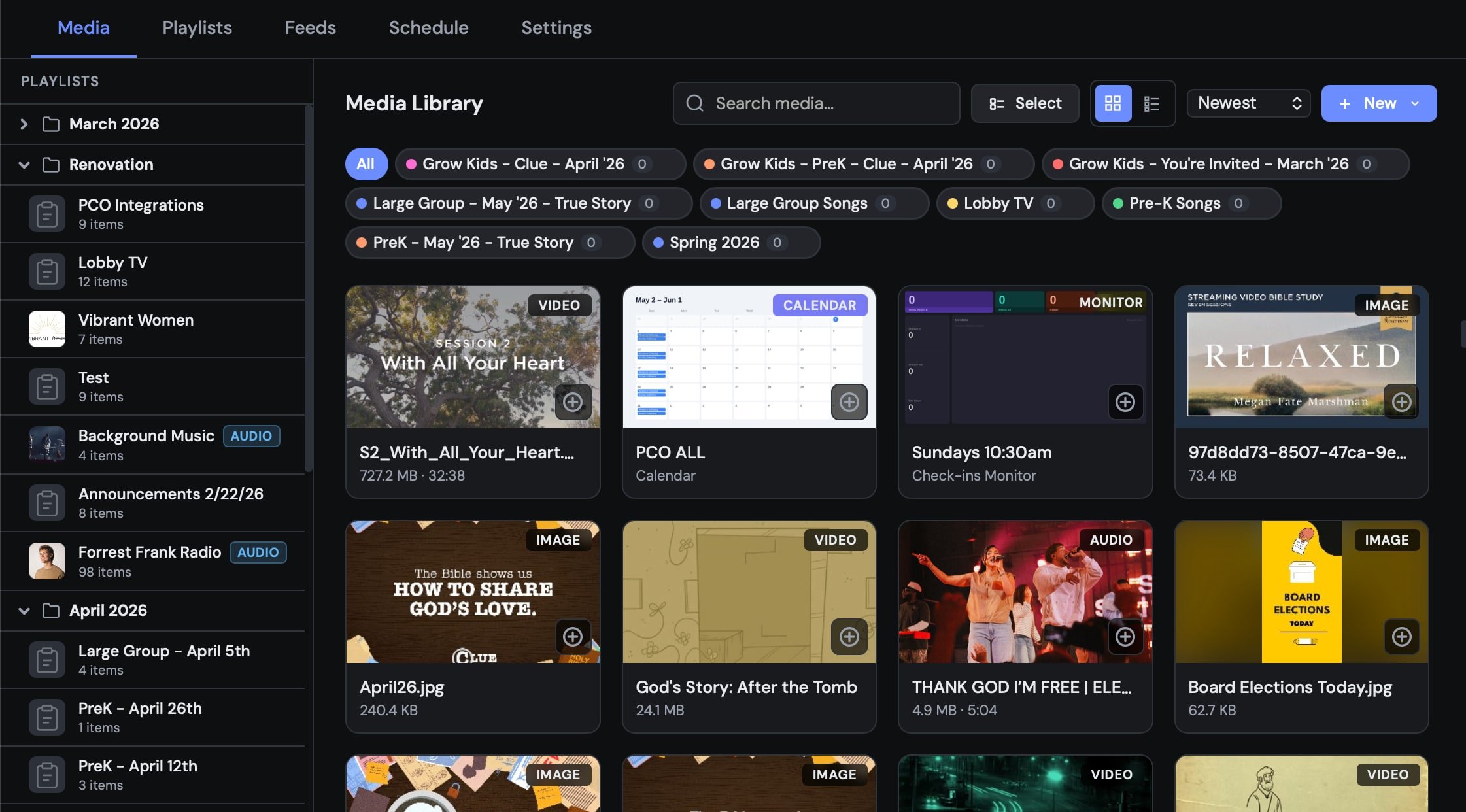 LightLoop is a free, browser-based media management platform designed for churches, schools, and nonprofits who need reliable, unattended screen playback — without IT expertise or monthly fees.
You upload media through the web dashboard, organize it into playlists and feeds, and your Apple TVs download everything locally so screens play without internet, without buffering, and without interruption.
## How it works
Upload videos, images, audio, and more from the web dashboard. Files are stored securely in your own Google Drive — LightLoop never charges for storage.
Organize media into playlists (ordered sequences) and assign them to a feed. A feed is what your Apple TV subscribes to.
Open the LightLoop app on your Apple TV, enter your Feed ID, and the TV downloads everything automatically.
All media is cached locally on the Apple TV. Screens play reliably even if the internet goes down. Changes you make in the dashboard sync in real time when the TV is online.
## Why LightLoop?
No plans, no limits, no feature gates. LightLoop is free for everyone — forever.
Media is stored in your Google Drive. Nonprofits on Google Workspace get 100 TB free.
Apple TVs cache everything locally. Services run smoothly even when the internet doesn't.
Update a playlist on your laptop and every connected TV refreshes automatically — no reboots needed.
Pause points, scheduled playlists, Welcome Party check-in greetings, and PCO integration are all built in.
Anyone on your team can manage screens through a simple drag-and-drop web interface.
TV Wall Output drives a program screen, confidence monitor, and livestream lower-thirds (with downstream-key alpha) from a single Apple TV.
## Key concepts
| Term | What it means |
| -------------------- | ---------------------------------------------------------------------------------------------------------- |
| **Media** | A single file — video, image, audio, song, livestream, web snapshot, or calendar |
| **Playlist** | An ordered list of media items that plays in sequence |
| **Feed** | A collection of playlists that an Apple TV subscribes to |
| **Feed ID** | The 6-character code your Apple TV uses to connect to a feed |
| **Song** | Synchronized lyric slides timed to a backing audio track (requires Apple TV app v1.1+) |
| **Soundtrack** | A background audio playlist that plays independently behind your main content |
| **Pause Point** | A timestamp where a video automatically pauses until someone advances it |
| **Monitor** | A live check-in roster or calendar rendered as a screen-ready image |
| **Welcome Party** | An animated full-screen greeting triggered when a child checks in |
| **LightLoop Remote** | A free iOS companion app for iPhone/iPad that controls the Apple TV and displays a live confidence monitor |
| **TV Wall** | A per-feed mode that splits one Apple TV into a 2×2 grid of four independent 1080p outputs |
## What you'll need
* A Google account (to sign in and store media)
* An Apple TV (4th generation or newer) with the LightLoop app installed
* Optionally: an iPhone or iPad with the free **LightLoop Remote** app for live control and stage display
Set up your account and get your first playlist on screen in under 10 minutes.
LightLoop is a free, browser-based media management platform designed for churches, schools, and nonprofits who need reliable, unattended screen playback — without IT expertise or monthly fees.
You upload media through the web dashboard, organize it into playlists and feeds, and your Apple TVs download everything locally so screens play without internet, without buffering, and without interruption.
## How it works
Upload videos, images, audio, and more from the web dashboard. Files are stored securely in your own Google Drive — LightLoop never charges for storage.
Organize media into playlists (ordered sequences) and assign them to a feed. A feed is what your Apple TV subscribes to.
Open the LightLoop app on your Apple TV, enter your Feed ID, and the TV downloads everything automatically.
All media is cached locally on the Apple TV. Screens play reliably even if the internet goes down. Changes you make in the dashboard sync in real time when the TV is online.
## Why LightLoop?
No plans, no limits, no feature gates. LightLoop is free for everyone — forever.
Media is stored in your Google Drive. Nonprofits on Google Workspace get 100 TB free.
Apple TVs cache everything locally. Services run smoothly even when the internet doesn't.
Update a playlist on your laptop and every connected TV refreshes automatically — no reboots needed.
Pause points, scheduled playlists, Welcome Party check-in greetings, and PCO integration are all built in.
Anyone on your team can manage screens through a simple drag-and-drop web interface.
TV Wall Output drives a program screen, confidence monitor, and livestream lower-thirds (with downstream-key alpha) from a single Apple TV.
## Key concepts
| Term | What it means |
| -------------------- | ---------------------------------------------------------------------------------------------------------- |
| **Media** | A single file — video, image, audio, song, livestream, web snapshot, or calendar |
| **Playlist** | An ordered list of media items that plays in sequence |
| **Feed** | A collection of playlists that an Apple TV subscribes to |
| **Feed ID** | The 6-character code your Apple TV uses to connect to a feed |
| **Song** | Synchronized lyric slides timed to a backing audio track (requires Apple TV app v1.1+) |
| **Soundtrack** | A background audio playlist that plays independently behind your main content |
| **Pause Point** | A timestamp where a video automatically pauses until someone advances it |
| **Monitor** | A live check-in roster or calendar rendered as a screen-ready image |
| **Welcome Party** | An animated full-screen greeting triggered when a child checks in |
| **LightLoop Remote** | A free iOS companion app for iPhone/iPad that controls the Apple TV and displays a live confidence monitor |
| **TV Wall** | A per-feed mode that splits one Apple TV into a 2×2 grid of four independent 1080p outputs |
## What you'll need
* A Google account (to sign in and store media)
* An Apple TV (4th generation or newer) with the LightLoop app installed
* Optionally: an iPhone or iPad with the free **LightLoop Remote** app for live control and stage display
Set up your account and get your first playlist on screen in under 10 minutes.